The Premium Settings page provides additional controls for Emails, Jobs, and other settings.
Email Branding
Email Branding allows you to change the email template branding. From here you can change the From, the Logo, and the Signature.
Candidate Actions
Background Check - GoodHire
When this is On, applicants will be screened through GoodHire.
Application Builder
The Application Builder allows you to customize your application, and make it available as a downloadable PDF for applicants. For more information, see Job Application Builder Overview.
Receive applicants with incomplete job application
This allows applicants to submit a job application even when it is incomplete.
Jobs Page
Can public users view my jobs page?
When set to On, you can set a custom URL for applicants to use to apply for your posted jobs.
- IMPORTANT NOTE: The URL can only be set once. Once set, this can not be changed.
Say goodbye to paper applications!
With this setting, you can add a logo and allow users to submit their applications via SMS.
Premium Settings
Cover Letter
Allow applicants to upload an optional cover letter.
Resume
Users can set whether resume uploading is required, optional, or disabled the default for all Jobs created:
-
Should applicants send a resume when applying to your jobs?: This controls whether a candidate can upload a resume file with the following options:
- Yes, a resume is required: The candidate must upload a resume to complete the application process.
- A resume is optional: The candidate can upload a resume, but it is not required to upload the resume.
- No, disable resume upload: The candidate is not provided with the ability to upload a resume.
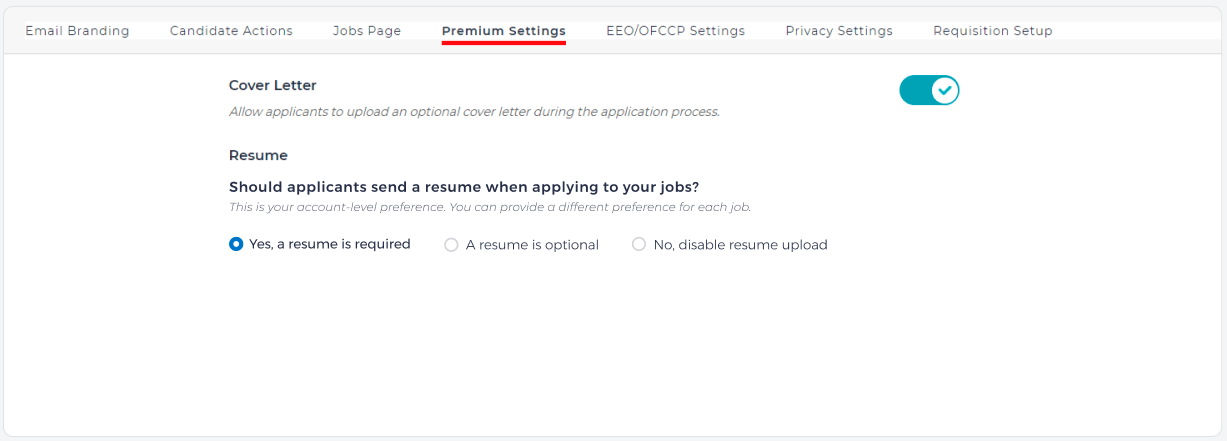
This setting can be altered at the individual Job level. For more information, see How to Post a Job.
Allow applicants to apply using job board accounts
This option allows applicants to use their Indeed, Monster or LinkedIn accounts. When set to Off, applicants can not use those accounts.
EEO/OFCCP Settings
Collect EEO data from applicants?
When this is set to On, candidates will be queried on their race, color, and other information to ensure that the process complies with U.S. Equal Employment Opportunity Commission (EEOC) requirements.
Privacy Settings
The Privacy settings has two options:
- Public: Job seekers can view your company details.
- Private: The job seekers can not see your company details.
Requisition Setup
Enable Requisitions?
When this setting is On, jobs must be requested and approved before they are posted.
If more than one person is involved in the requisition approval process
This determines how to send the requisition request, whether is it sent to all approvers at once, or in order.