The ACA Dashboard provides a quick view of your ACA Compliance page.
After registering for ACA Compliance, you can check your compliance from your ACA Compliance Dashboard. This displays a quick view of your compliance and allows access to reporting, settings, and compliance submission.
The ACA Dashboard is separated into the following sections:
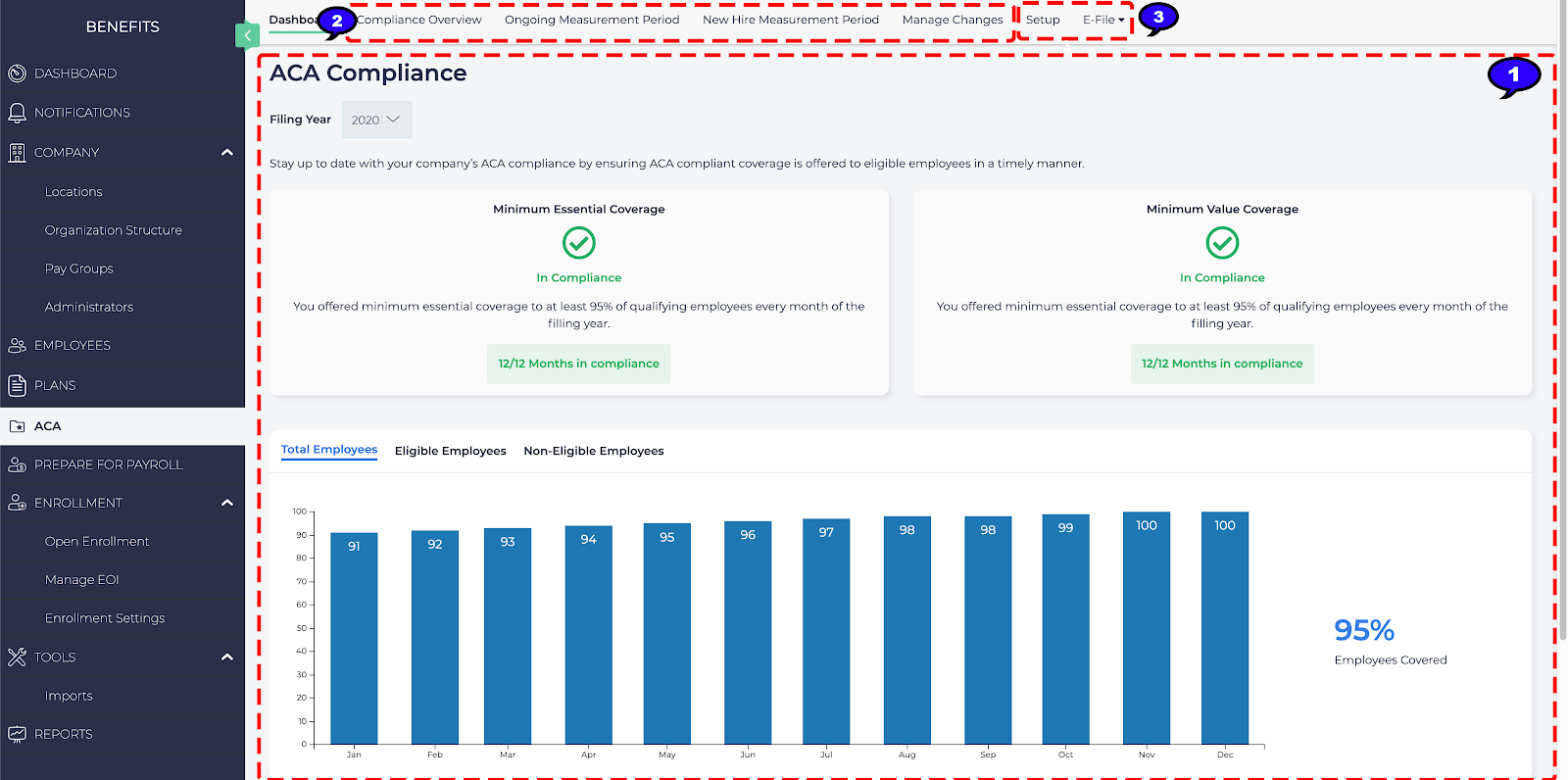
- Summary: Presents an overall summary of your ACA Compliance and any issues to be aware of. From the summary page, you can view:
- Minimal Essential Coverage Compliance and Minimum Value Coverage: Displays whether your company is compliant with these ALE requirements and how many months.
- Total Employees: Shows the percentage how many total employees per month are currently covered as per the ALE requirements.
- Eligible Employees: Shows the percentage of how many eligible employees per month are currently covered as per the ALE requirements.
- Non-Eligible Employees: Shows the percentage of non-eligible employees per month covered.
- Reports: View data on your company’s compliance. For more information, see ACA Compliance Reports.
- Actions: Take action regarding your ACA Compliance including:
- Setup: Make changes to your ACA compliance settings. For more information, see How to Setup ACA Compliance.
- E-File: Submit your ALE ACA Compliance electronically to the IRS through Nelco. For more information, see How to E-File ACA Compliance.