Communication is an important tool to achieve maximum employee enrollment during the Open Enrollment period. The Benefit Administration Platform provides a robust solution for employee communication. To send a mass email to a set of employees, use Send/Schedule email option on the Open Enrollment Record.
You can find this by selecting Open Enrollment and selecting an enrollment record, and scrolling down to see Send/Schedule Email next to Communication.

You can choose to schedule emails to go out on a certain date and time and also to a certain group of employees.
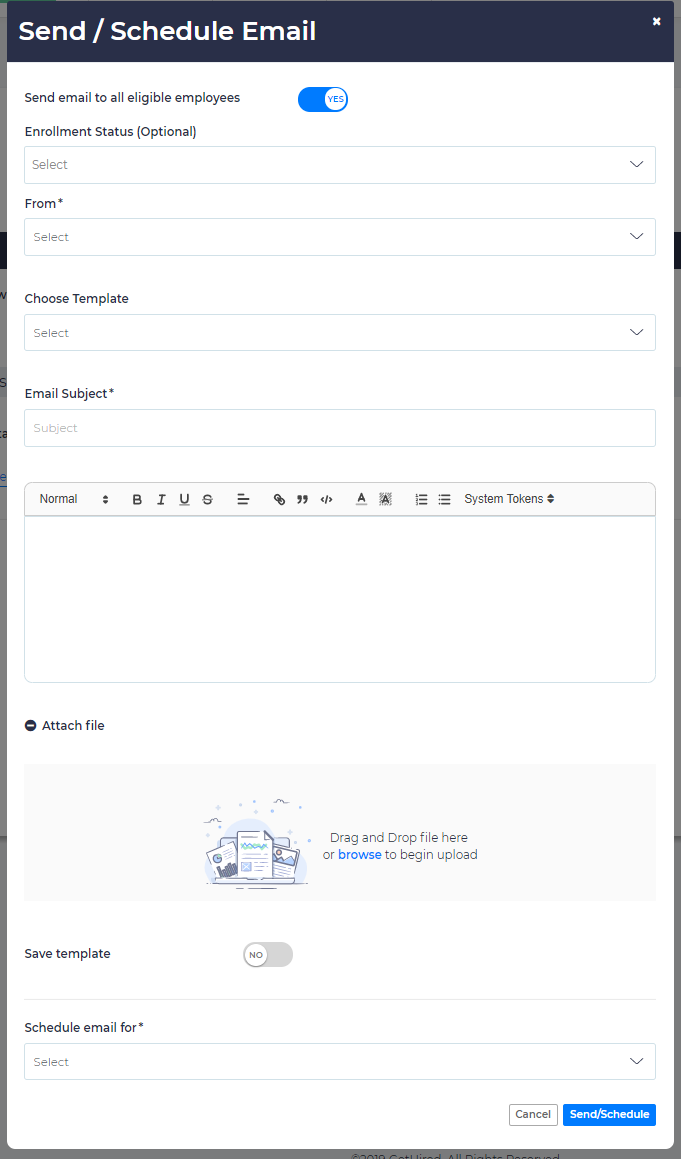
To send an email or schedule email(s), go to active open enrollment record, select Send/Schedule.
Select all eligible employees or a group of employees. You can further filter employees with their enrollment status for this Open Enrollment such as Not Started, In Progress and Completed. Then select the sender of the email from the From dropdown menu where all Broker users and company HR users are listed.
Provide an Email Subject line, then select a system template or type your own message in the editor box. You can use the rich text editor to format the message. Also, use System Tokens in the message to personalize the email for each individual recipient. You can also attach document(s) if desired.
This email can be sent immediately or can be scheduled to go out on a certain date & time. Emails can also be scheduled to go out on a certain day with reference to open enrollment window date.
You can save email templates for future use. Only Email subject line and Message will be saved as a template. Email logs can be traced.